2023-04-11 14:22:23 +08:00
<p align="center">
<img src="https://ctstack-oss.oss-cn-beijing.aliyuncs.com/veinmind/safeline-assets/safeline_logo.png" width="120">
</p>
2023-04-14 10:54:45 +08:00
<h1 align="center">SafeLine Community Edition</h1>
<h3 align="center">Keep hackers at bay</h3>
2023-04-11 14:22:23 +08:00
<br>
<p align="center">
<img src="https://img.shields.io/badge/SafeLine-BEST_WAF-blue">
<img src="https://img.shields.io/github/release/chaitin/safeline.svg?color=blue" />
<img src="https://img.shields.io/github/release-date/chaitin/safeline.svg?color=blue&label=update" />
2023-04-14 10:54:45 +08:00
<img src="https://img.shields.io/docker/v/chaitin/safeline-mgt-api?color=blue">
2023-04-11 14:22:23 +08:00
<img src="https://img.shields.io/github/stars/chaitin/safeline?style=social">
</p>
2023-04-17 14:34:47 +08:00
<p align="center"> <a href="https://waf-ce.chaitin.cn/">Official Website</a> </p>
2023-04-14 10:54:45 +08:00
<p align="center"> English | <a href="README_CN.md">中文文档</a> </p>
2023-04-11 14:22:23 +08:00
2023-04-14 10:59:20 +08:00
A simple and easy to use WAF tool. Built on [Chaitin Technology ](https://www.chaitin.cn/en/ )'s ace 🤖️ ️
2023-04-11 14:22:23 +08:00
## ✨ Demo
2023-04-14 13:54:26 +08:00
### 🔥🔥🔥 Online Demo: https://demo.waf-ce.chaitin.cn:9443/
2023-04-14 11:08:18 +08:00
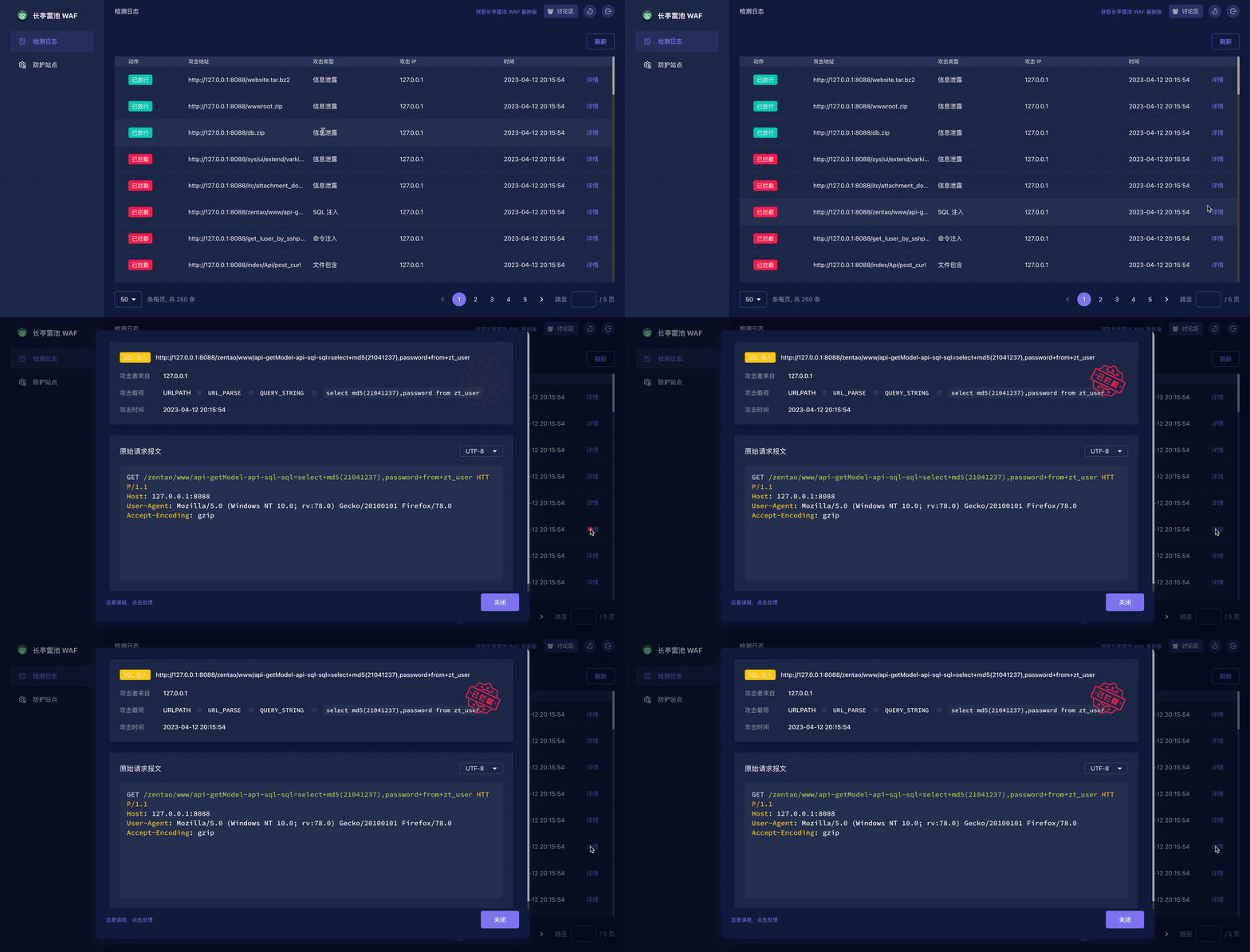
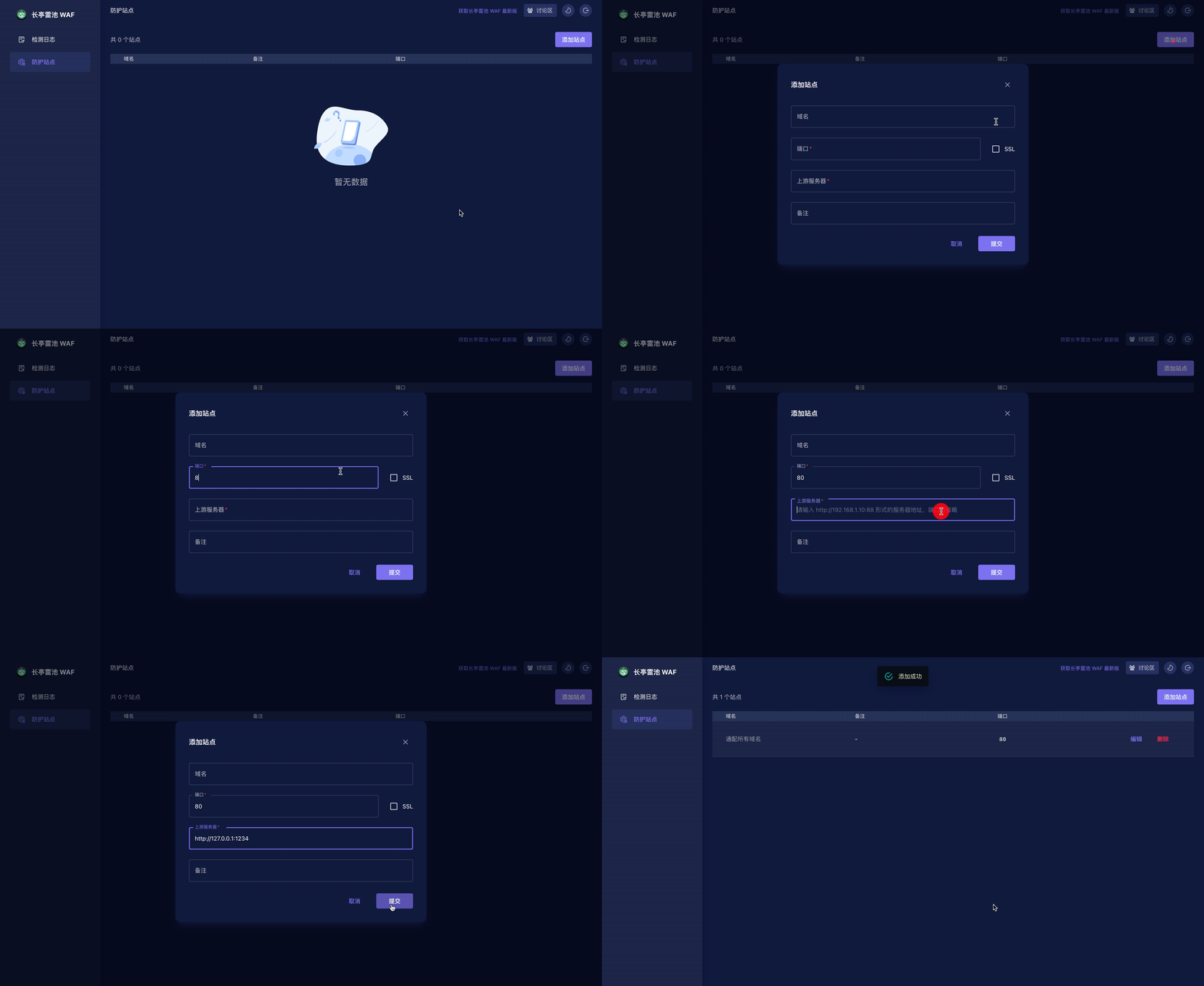
There is a simple http server, listened on `http://127.0.0.1:8889` , can be used as for testing.
2023-04-11 14:22:23 +08:00
2023-04-14 10:54:45 +08:00
## 🚀 Installation
2023-04-11 14:22:23 +08:00
2023-04-14 10:54:45 +08:00
### 1. Make sure [Docker](https://docs.docker.com/engine/install/) and [Compose V2](https://docs.docker.com/compose/install/) are installed correctly on the machine
2023-04-15 15:29:55 +08:00
```shell
docker info # >= 20.10.6
docker compose version # >= 2.0.0
2023-04-11 14:22:23 +08:00
```
2023-04-15 15:29:55 +08:00
### 2. Setup and deploy
2023-04-11 14:22:23 +08:00
```shell
2023-04-15 15:29:55 +08:00
mkdir -p safeline && cd safeline
# setup
2023-04-17 22:53:43 +08:00
curl -kfLsS https://waf-ce.chaitin.cn/release/latest/setup.sh | bash
2023-04-13 23:40:55 +08:00
2023-04-14 10:54:45 +08:00
# launch
2023-04-11 14:22:23 +08:00
sudo docker compose up -d
```
2023-04-20 14:25:19 +08:00
#### Upgrade
**WARN: SafeLine will be restarted and your traffic will be unavailable for a short period of time. You may need to choose a proper time for upgration.**
2023-04-27 18:24:01 +08:00
```shell
curl -kfLsS https://waf-ce.chaitin.cn/release/latest/upgrade.sh | bash
2023-04-21 15:25:46 +08:00
2023-04-20 14:25:19 +08:00
# replace with `docker-compose` if necessary.
docker compose down && docker compose pull && docker compose up -d
```
2023-04-14 10:54:45 +08:00
## 🕹️ Quick Start
2023-04-11 14:22:23 +08:00
2023-04-14 10:54:45 +08:00
### 1. Login
2023-04-11 14:22:23 +08:00
2023-04-14 10:54:45 +08:00
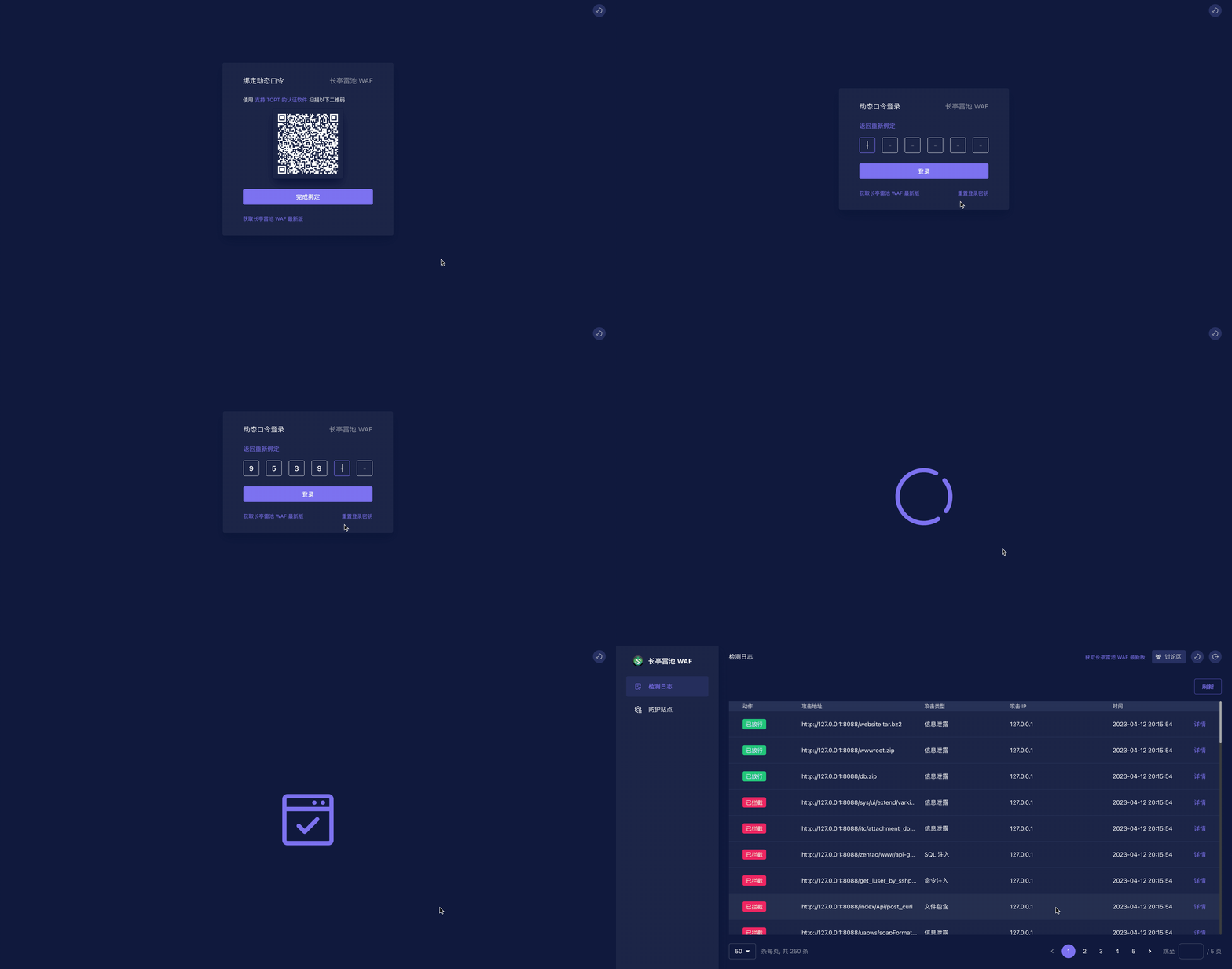
Open admin page `https://<waf-ip>:9443` and scan qrcode with any authenticator Apps that support TOTP, enter the code to login.
2023-04-11 14:22:23 +08:00
2023-04-14 10:54:45 +08:00
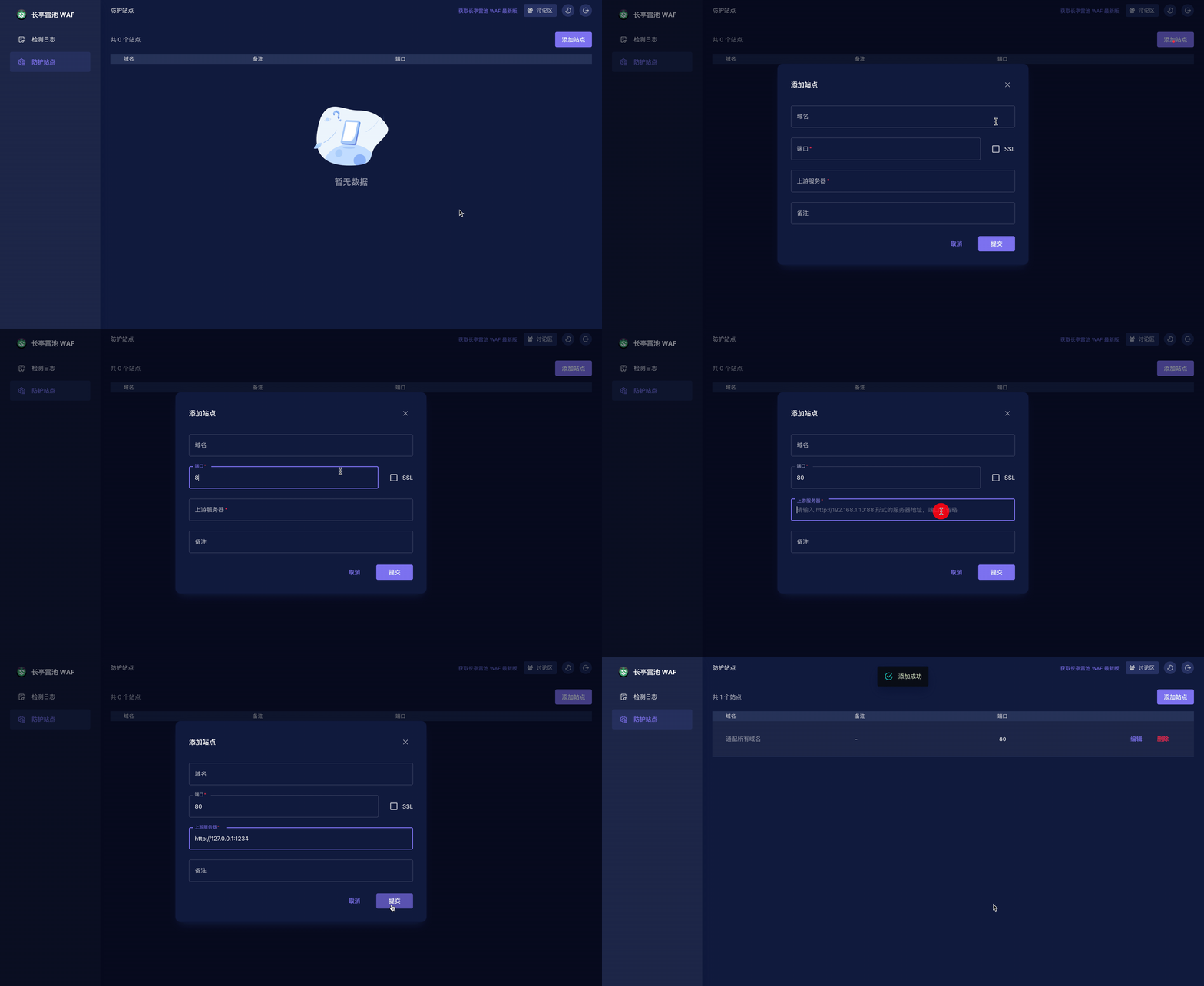
### 2. Create website
2023-04-11 14:22:23 +08:00
2023-04-14 10:54:45 +08:00
<font color=grey>💡 TIPS: After creating website, `curl -H "Host: <Domain>" http://<WAF IP>:<Port>` to check if you can get correct response from web server.</font>
2023-04-11 14:22:23 +08:00
2023-04-14 10:54:45 +08:00
### 3. Deploy your website to SafeLine
2023-04-11 14:22:23 +08:00
2023-04-14 10:54:45 +08:00
- If your website is hosted by DNS, just modify your DNS record to WAF
- If your website is behind any reverse-proxy like nginx, you can modify your nginx conf and set upstream to WAF
2023-04-11 14:22:23 +08:00
2023-04-14 10:54:45 +08:00
### 4. Protected!👌
2023-04-11 14:22:23 +08:00
2023-04-14 10:54:45 +08:00
Try these:
2023-04-11 14:22:23 +08:00
2023-04-14 10:54:45 +08:00
- `http://<IP or Domain>:<Port>/webshell.php`
- `http://<IP or Domain>:<Port>/?id=1%20AND%201=1`
- `http://<IP or Domain>:<Port>/?a=<script>alert(1)</script>`
2023-04-11 14:22:23 +08:00
2023-04-15 17:55:22 +08:00
## 📖 FAQ
Please refer to our [FAQ ](FAQ.md ) first if you have any questions.
For examples:
- [docker compose or docker-compose? ](FAQ.md#docker-compose-or-docker-compose )
- [website configurations ](FAQ.md#站点配置问题 )
- [website not working / not correctly response ](FAQ.md#配置完成之后还是没有成功访问到上游服务器 )
2023-04-14 10:54:45 +08:00
## 🏘️ Contact Us
2023-04-11 14:22:23 +08:00
2023-04-14 10:54:45 +08:00
1. You can make bug feedback and feature suggestions directly through GitHub Issues.
2. By scanning the QR code below (use wechat or qq), you can join the discussion group of SafeLine users for detailed discussions.
2023-04-11 14:22:23 +08:00
2023-04-20 14:53:35 +08:00
<img src="https://waf-ce.chaitin.cn/images/wechat-light.png" width="30%" />
2023-04-11 14:22:23 +08:00
## ✨ CTStack
<img src="https://ctstack-oss.oss-cn-beijing.aliyuncs.com/CT%20Stack-2.png" width="30%" />
2023-04-14 10:54:45 +08:00
SafeLine has already joined [CTStack ](https://stack.chaitin.com/tool/detail?id=717 ) community.
2023-05-10 13:55:35 +08:00
## Star History <a name="star-history"></a>
<a href="https://github.com/chaitin/safeline/stargazers">
<img width="500" alt="Star History Chart" src="https://api.star-history.com/svg?repos=chaitin/safeline&type=Date">
</a>
