If you are interested in remote control technology and find this project useful, feel free to add a Star. Fork, Watch, submit Issues, or open Pull Requests are all welcome. The author will address issues and maintain the project during spare time.
[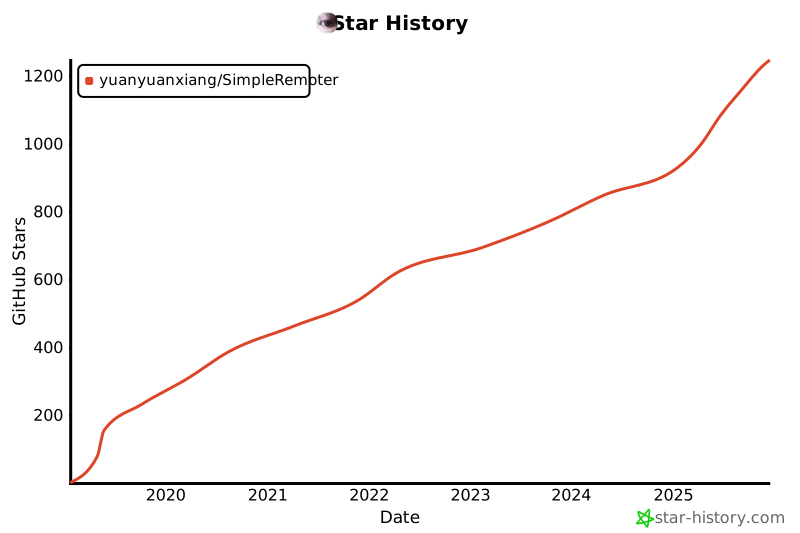](https://star-history.com/#yuanyuanxiang/SimpleRemoter&Date)
<span style="color:#FF5722; font-weight:bold;">*This program is for educational and technical research purposes only. Users are fully responsible for any consequences arising from its usage.*</span>
**Project Purpose:** This project is suitable for remote work, remote device management, remote assistance, and other legitimate use cases.
**Compilation Method:** Please use **git clone** to get the project code. Downloading as a ZIP file may result in UNIX-style line endings, which can cause unexpected compilation issues.
This project is developed and maintained using **VS2019**, and is also compatible with newer compilers such as **VS2022/VS2026**. For details, see [#171](https://github.com/yuanyuanxiang/SimpleRemoter/issues/171).
When using newer compilers, you may encounter dependency library conflicts. For solutions, refer to [#269](https://github.com/yuanyuanxiang/SimpleRemoter/issues/269).
The master controller may display garbled text on non-Chinese systems. For solutions, refer to [#157](https://github.com/yuanyuanxiang/SimpleRemoter/issues/157).
This project is a research-oriented implementation of remote control technology and is intended solely for legal and educational use. **Strictly prohibited**: any illegal access, control, or monitoring of others' devices.
This software is provided "as is" without any express or implied warranties. Use of this software is at your own risk. The developer is not liable for any illegal or malicious use of this software. Users must comply with applicable laws in their jurisdiction and use the software responsibly. The developer assumes no responsibility for any direct or indirect damages caused by use of this software.
- **Hierarchical Control**: Using subordinate master controllers as relays, superusers can control any computer in the entire system
- **Isolation Mechanism**: Computers managed by different master controllers (Master 1, 2, 3, etc.) are isolated from each other; each master can only control clients generated by itself
- **Centralized Authorization**: Authorization for all master controllers is managed uniformly by superusers
The master controller executable is **YAMA.exe**. It serves as the Server side, based on IOCP communication model, supporting tens of thousands of clients online concurrently. Thanks to the layered architecture, the supported number of hosts can increase by an order of magnitude. For example, if one superuser manages 10 masters, and each master handles 10,000 clients, the superuser can control up to 100,000 clients.
The following showcases the master controller's interface. All features are available and stable. Some operations require the client to run with administrator privileges.
The main UI displays all connected clients in a list format. After selecting a host, you can perform remote control operations such as modifying notes, proxy mapping, or executing code.
**Terminal Management**: Opens a command-line window to execute remote commands. A [minimal version](./linux/main.cpp) is also available that supports Linux clients for Linux developers to research.
**Process Management**: Displays running processes on the controlled machine. You can start/stop normal processes or inject code (cannot operate on high-privilege processes).
The VIRTUAL (virtual desktop) mode can run the remote desktop program in the background on the controlled computer, optimized for smooth operation. Additionally, it supports reporting active windows and detecting specified software. Screen transmission is deeply optimized with SSE2 and multi-threading, achieving up to 30 FPS across networks. Remote desktop control supports multiple monitors and video wall display, as well as privacy screen. If the client runs as a Windows service, it supports remote control during lock screen and password input to unlock. Supports using Ctrl+C and Ctrl+V to transfer files between master and client.
**Voice Management**: Monitor sound from the controlled machine, or send voice to the controlled computer (requires audio devices on the controlled machine).
**Video Management**: Opens the controlled machine's webcam. Camera detection is enabled by default in settings, and the host list will display camera status.
**Service Management**: View the service list on the controlled machine. If permissions allow, you can start, stop, or perform other operations on services.
- **Machine Management**: Execute logout, shutdown, or restart operations on controlled hosts
- **Client Management**: Transfer or share clients, supports setting expiration dates with automatic recovery after expiration
- **Client Proxy**: Enable proxy mapping for SOCKS proxy via client; or use FRP to proxy specific ports (e.g., 3389) on the client, enabling remote desktop control via mstsc.exe
- **Execute Program**: Client downloads and executes EXE programs from remote, or upload EXE programs from master to client for execution
- **Execute Code**: Write a DLL that conforms to specifications, and it can be transmitted to the client for execution with high flexibility. The client caches this DLL to avoid repeated transmission
Since v1.0.8, operating the master controller requires authorization. Newly compiled programs have a 14-day trial period, after which generating clients requires a "serial number" to apply for an unlock code. To disable this authorization logic, refer to the `OnOnlineBuildClient` function and recompile the program. See: [#91](https://github.com/yuanyuanxiang/SimpleRemoter/issues/91). The "unlock code" includes an authorization date range, ensuring one code per machine; the authorization logic checks whether the computer date has been tampered with. Generating an unlock code requires a password.
Since v1.1.1, authorization for newly compiled programs has been revoked. Anyone using this program must compile it themselves, otherwise a dialog will appear after 10 minutes of use requiring an unlock code. The introduction of this authorization mechanism can keep users without programming experience out. If you just want to experience this remote control program, we recommend using v1.0.7 or earlier versions, as their core functionality is essentially the same as later versions. If you are interested in the technology, we believe you have sufficient ability to compile the program yourself.
Since v1.2.0, the master controller must obtain authorization, otherwise functionality will be limited. Authorization methods support binding by computer or by domain name. Attempts to bypass authorization may cause the master controller to stop working. Master controllers that have obtained authorization will automatically disconnect from the authorization server. If authorization is unsuccessful, the connection to the authorization server will be maintained along with necessary data exchange—this mechanism may be defined as a "backdoor", but it is necessary and cannot be bypassed.
Note: Since [v1.0.8](https://github.com/yuanyuanxiang/SimpleRemoter/releases/tag/v1.0.0.8), `TestRun.exe` uses memory-loaded DLL execution, requesting the DLL from the master controller and executing it in memory, which facilitates hot code updates.
Intranet deployment means the master controller and controlled devices are within the same local network, where controlled devices can directly connect to the master's address. This deployment method is very simple—just fill in the master's IP and port when generating the client.
Internet deployment means the master controller and controlled programs are on different networks, where the master device has no public IP and controlled devices cannot directly connect to the master's address. In this case, a "middleman" is needed to tunnel the master's internal IP. One method is using [Peanuthull](./使用花生壳.txt), which won't be covered here. For cross-border/international remote control, we strongly recommend using a VPS instead of Peanuthull.
Use a VPS (Virtual Private Server) as the "middleman" to control remote devices. You can also use a physical server, but VPS is more cost-effective. Typically you need to purchase VPS service. Communication between VPS and the program is based on [FRP](https://github.com/fatedier/frp).
In this deployment mode, when generating the client program, fill in the VPS IP (some VPS providers offer domain names, which can also be used). Typically, run the FRP server on the VPS and the FRP client locally. When a host connects to the VPS, the VPS forwards the request to the local computer; similarly, control requests are also relayed through the VPS to the controlled host.
For cross-network, cross-border, or international remote control system deployment, see: [Reverse Proxy Deployment Guide](./反向代理.md), which is the method used by the author in practice.
This release enhances remote desktop features (FPS control, screen switching, file drag-and-drop support), improves Windows service mode, and fixes several stability issues.
- [HoldingHands](https://github.com/yuanyuanxiang/HoldingHands): A remote control program with a fully English interface, using a different architectural design
- [BGW RAT](https://github.com/yuanyuanxiang/BGW_RAT): A fully featured remote control program (Big Grey Wolf 9.5)
- [Gh0st](https://github.com/yuanyuanxiang/Gh0st): Another remote control program based on Gh0st
**Sponsorship:** This project stems from technical learning and personal interest. The author will update irregularly based on spare time. **If this project has been helpful to you, please consider supporting it via the sponsor icon.** If you prefer to sponsor through other methods (e.g., WeChat, Alipay, PayPal), please click [here](https://github.com/yuanyuanxiang/yuanyuanxiang/blob/main/images/QR_Codes.jpg).
